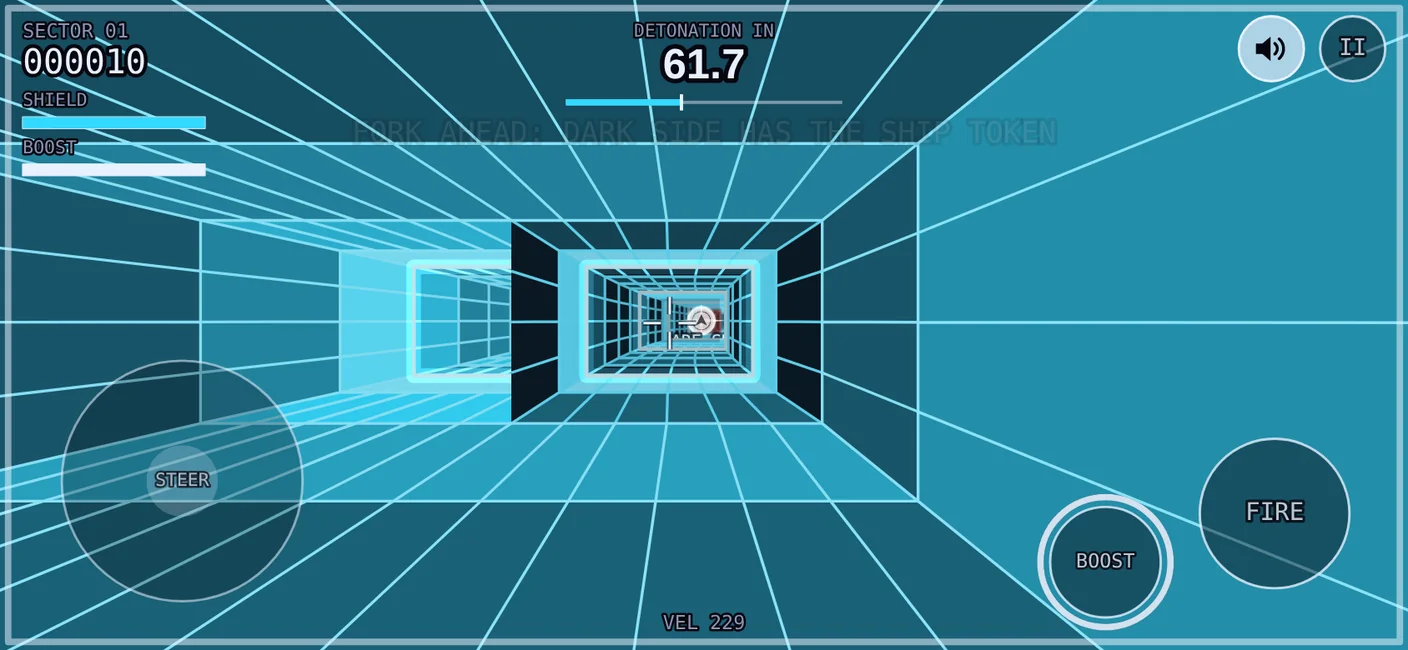
How to play
The year is 1999. Baron Von Kaboom has buried a Doomsday Device at the centre of the Earth, and the only way in is his network of colour-coded tunnels. You are Ace Chase. The ship is a rental.
Each tunnel is a sector with its own countdown. Reach the far end before the clock hits zero and you move on to the next sector. Run out of shield or run out of time and you lose the ship.
When your shield is down to its last 15%, the shield bar and the edges of the screen pulse red.
Leave the title screen alone for a few seconds and the game plays a sector by itself behind the menu, to show what it looks like. The pilot is a simple bot, and not a good one. Tap to launch as usual. After a minute and a half the demo stops and the title waits quietly.
The colour code
Three colours tell you what to do with everything in the tunnel.
- Red: dodge Walls. Flying into one costs 20 shield.
- Yellow: shoot Gates are walls built from blocks you can shoot out. Each block is worth 25 points, and from Sector 3 the blocks with a double outline take two shots. Flying into a block costs 18 shield.
- Yellow: shoot Mines slide from side to side. Shoot one for 100 points. Flying into one costs 16 shield.
- White: collect Time, shield and boost cells are small white diamonds. Time adds 4 seconds, shield adds 25, and boost refills your boost. Each is worth 50 points.
- White: collect The ship token is the large white coin with a ship on it. Collect it, finish the sector, and a spare ship is waiting for you. It is worth 200 points.
Controls
| To | On a phone | On a keyboard |
|---|---|---|
| Steer | Left thumb on the stick | Arrow keys or W A S D |
| Fire | Hold the FIRE button, the one with the gun sight | Hold Space |
| Boost | Hold the BOOST button, the one with two arrows | Hold Shift |
| Pause | The pause button, top right | P or Esc |
| Sound | The speaker button | M |
| Settings | The gear button, shown on the title screen and while paused | T |
| Full screen | Add the game to your home screen | F |
| Skip a cut scene | SKIP | Esc |
The guns reach a little under half of what you can see, so a gate or a mine has to come close before you can hit it. They also overheat: about two and a half seconds of unbroken fire locks them for a second and a half while they cool. Fire in bursts and they stay cool. On a phone the fire button is its own gauge: bright while the guns are cool, draining as they heat up, and dark with a broken outline while they are locked. Its ring blinks red just before they overheat. With a keyboard, a GUNS bar in the top left shows the heat instead.
Boost flies the ship half as fast again. A full reserve lasts six seconds of holding. A boost cell refills it, and so does the start of each sector. On a phone the boost button is its own gauge: bright while there is boost left, draining as you use it, and dark with a broken outline once it is empty. Its ring blinks red just before it runs out. With a keyboard, a BOOST bar in the top left shows the reserve instead.
Tilt steering is in the settings. With it on, tilting the phone steers the ship and your left thumb aims the guns. An iPhone asks permission to use its motion sensor first. Tilt takes practice; the thumb stick is the easier way to fly.
The settings also have sliders for steering speed, flight speed and how sharply the tunnels bend.
Forks
Partway through every sector the tunnel widens and splits in two. Both branches keep the sector's colour, one light and one dark.
- The light branch has fewer obstacles and more pickups, but no ship token.
- The dark branch has more obstacles, and the sector's ship token floats just inside it.
Which side is dark changes from sector to sector. Clipping the wall between the branches costs 18 shield.
Ships
You start with one ship and no spares. Collect a sector's ship token, finish that sector, and you gain a spare, up to five.
If you lose a ship with a spare in hand, you carry on with a full shield. After a crash you continue from the same spot. If the clock ran out, the sector starts again with a fresh countdown. Lose your last ship and the run is over.
Scoring
- Points build up with every stretch of tunnel you fly.
- Time, shield and boost cells: 50 each. Ship token: 200.
- Gate blocks: 25 each. Mines: 100 each.
- Points for anything you shoot or collect show for a moment as a running total beside your score.
- Finishing a sector: 10 points for every second left on the clock, plus 2 for every point of shield. You also get 20 shield back.
The story runs for ten sectors in two parts. Part Two, from Sector 6, has a look of its own: dark tunnels drawn in glowing neon lines. After the story ends, the tunnels keep going for as long as you can.
Add it to your phone
Opened from an icon on your home screen, the game fills the whole screen with no browser bars. On an iPhone this is the only way to play full screen. On Android the game also goes full screen in the browser when you tap to start, but the icon is quicker.
iPhone, in Safari
- Open acechase.github.io/doomsday-tunnels in Safari.
- Tap Share. On recent versions of iOS it is under the ••• button beside the address bar. On older ones it is the square with an arrow in the toolbar.
- Scroll down and tap Add to Home Screen.
- If you see an Open as Web App switch, leave it on.
- Tap Add, then open the game from its new icon.
Android, in Chrome
- Open acechase.github.io/doomsday-tunnels in Chrome.
- Tap the ⋮ menu beside the address bar.
- Tap Add to Home screen. Some versions of Chrome call it Install app.
- Tap Install, then open the game from its new icon.
Good to know
- Hold the phone sideways. If your rotation lock is on, the game turns itself to fit.
- Sound starts with your first tap, and on an iPhone it can play even when the ring switch is set to silent. The speaker button turns it off.
- On an iPhone the home screen copy keeps its own settings and best score, so they start fresh the first time you open it.
- Once you have opened the game with a connection, it also works with none, in airplane mode for example. A run played offline cannot be posted to the scoreboard, but your best score is still saved on your device.
- On a computer, press F for full screen.
What the game counts
The game keeps daily totals so its maker can tell whether anyone is playing. It has no accounts, sets no cookies, shows no ads and uses no analytics service. Nothing it sends says who you are.
The one exception is a high score, which is public and carries the name you choose to type, along with your times for the sectors you cleared. Posting one is always up to you.
The demo that plays by itself on the title screen is not a run. It sends nothing and saves nothing.
What is sent, and when
When you start a run
- Your browser sends
- That a run has started. Whether it is the first run on this device today, and the first ever. Whether you are on a touch screen. Whether tilt steering is on.
- The server keeps
- One more on that day's totals: runs, players, new players, touch-screen runs and tilt runs.
When a run ends
- Your browser sends
- The sector you reached and how many seconds the run lasted.
- The server keeps
- That day's totals again: runs finished, seconds played and sectors cleared, plus a count of how many runs ended in each sector.
When you choose to post a score
- Your browser sends
- The name you typed, your score, the sector you reached, and your time for each sector you cleared in that run.
- The server keeps
- That name with its best score, the sector and the date, and that name's fastest time for each sector. This is the public scoreboard.
Looking at the scoreboard sends nothing about you. Only the game's maker can see the daily totals. Days are counted in UTC.
How players are counted without knowing who they are
Your browser remembers the date you last played. When you start a run it answers one question for the server: is this the first run on this device today, yes or no? The server adds up the yeses. It never receives anything that could tell two devices apart.
What is never stored
- Your IP address. The server uses it for about a minute to slow down spam, as described under other companies involved, and never writes it down.
- Your device, browser, screen size or operating system.
- Your location.
- Any ID for you or your device.
- A record of individual runs. Only the daily totals above are kept.
Opting out
If your browser has Do Not Track or Global Privacy Control switched on, your runs are not counted at all. The game still asks the server for a start time, which it needs if you later post a score, but nothing is added to the totals.
What stays on your device
The game saves a few things in your browser's storage for this site. They are never sent anywhere, apart from the name when you post a score.
- Your settings and your choice of thumb stick or tilt.
- Your best score, and your best time for each sector.
- The name you last posted, so it is filled in next time.
- The date you last played.
- A copy of the game itself, so that it can open without a connection.
Clearing this site's data in your browser removes all of it.
Other companies involved
The game cannot reach you without passing through two services, and each sees your connection in the way any website's host does.
- GitHub hosts the game and this page. GitHub logs the IP address of visitors to every site it hosts, for security.
- Cloudflare runs the scoreboard server. To stop one connection from flooding it, the server uses your IP address as a counter inside Cloudflare that lasts about a minute. It is never written to the game's database.
Nothing else is loaded from other sites. The game's fonts, images and code all come from the same place as the game itself.
The server's code is public. You can read exactly what it stores.
High scores
When a run ends, tap POST SCORE, type a name and send it. Your name, your score and the sector you reached then appear on a board that anyone playing the game can see, and your sector times go in for the fastest-times list. You can post once per run, and you never have to.
Names
- Up to 12 characters: letters, numbers, spaces and . _ - ! ? '
- Rude words are turned away, including the creative spellings.
- A name is not an account. There is no password, so anyone can type any name.
One entry per name
Each name has a single line on the board, holding the best score posted under it. Post a lower score under the same name and the entry stays as it was. Capital letters make no difference: ACE and Ace are the same entry.
Reading the board
The SCORES button on the title screen opens the board, and so does HIGH SCORES after a run. It lists the top ten by score, with the sector each run reached. When two scores are equal, the older one ranks higher.
The name you last posted shows in yellow. If your score lands outside the top ten, the board tells you your rank underneath.
This is an example, not the live board. The names are characters from the game's story, and the yellow line is how your own entry looks.
Fastest times
Every sector is timed, and every sector is the same tunnel for everyone, so times can be compared. The board's second page, FASTEST TIMES, lists the three fastest names for each of the first ten sectors. Tap its heading to switch to it.
- When you clear a sector, the game shows your time, your own best for that sector, and the record. Your own bests are kept on your device.
- Beat your own best for a sector and the game marks it with confetti and a jingle. A time that would make the top three gets a full fanfare, and so does a posted score that lands in the top ten.
- Times are sent together with your score when you tap POST SCORE, and never on their own. A fast sector in a run you do not post is not recorded.
- Each name keeps one time per sector, its fastest.
- Only runs at the standard flight speed count. If you have changed the flight speed in the settings, your times are shown but not ranked.
How scores are checked
Scores come from your browser, so the server cannot be sure every one is real. It turns away the ones that could not have happened:
- a score with no run behind it, or from a run that started more than 12 hours ago;
- a sector reached faster than 20 seconds per sector;
- a score higher than a run can earn by that sector;
- a sector time faster than the sector can be flown, or times that add up to longer than the run;
- more than six posts a minute from one connection.
A determined cheat can still get a score through. The game's maker can remove any entry. To ask for a name to be taken down, open an issue on GitHub.